Published
— 14 min read
Creating an Image Classification Model for Rematch
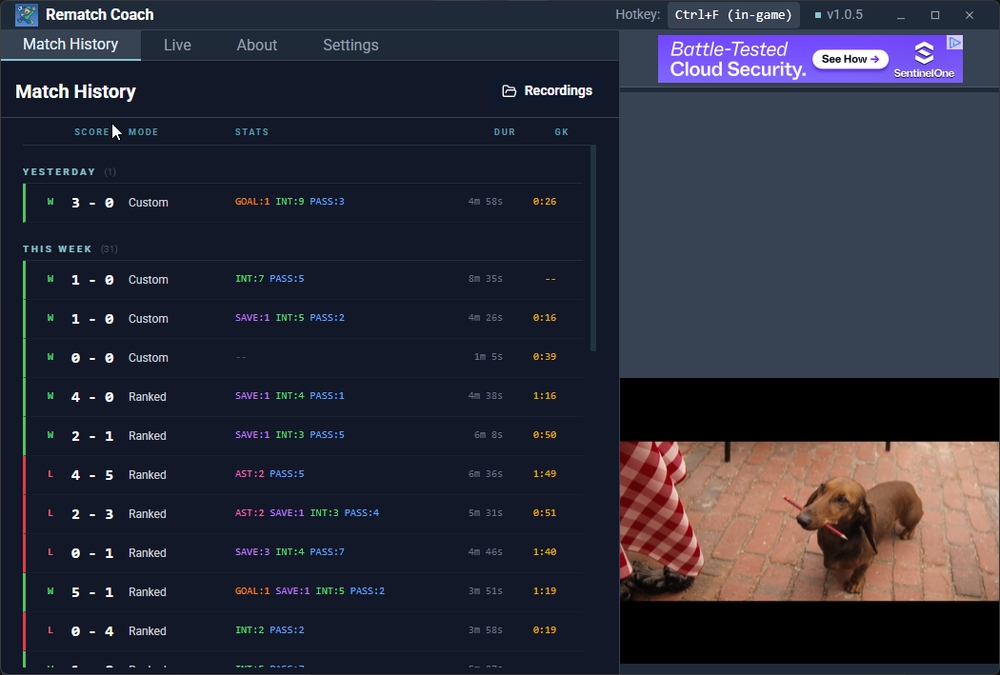
Note: No AI was used to write this article
Intro
Since last year, I’ve been hooked on competing in the football video game Rematch.
While in FIFA you control an entire team, in Rematch you only control a single player, presented in a third-person POV.
As a player, you win by scoring the most goals, and to do that, you work with your team by making passes, interceptions, goals, assists, and saves.
Rematch has a ranking system where players compete to the top of the ladder. As the game grows, it becomes more and more competitive to climb the ladder and achieve the top rank: Elite.
As I spend time competing, I found that it’s not enough to rake up hours of gameplay to rank up. Sure could do that in lower ranks (bronze, silver), but not in higher ranks like diamond. I must deliberately analyze the choices I made, those which led to victory and defeat.
The challenge is that Rematch does not have a comprehensive toolkit to let players analyze their gameplay.
More mature and popular videogames have screen recording features for example, which enables viewing previous gameplays. And aside from solutions within the videogames themselves, their huge communities built unofficial in-game overlay applications to provide players with further insights.
For example, League of Legends, Fortnite, TFT, and Valorant have a community of devs creating add-on in-game overlays providing players the ability to assess and grow their skills.
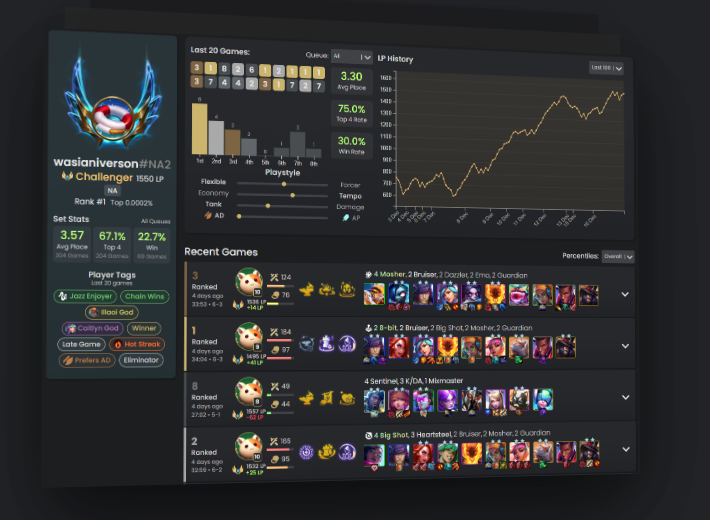 Figure: Screenshot of MetaTFT, a TFT in-game overlay with 6.5M+ downloads
Unlike these games, Rematch is still relatively new, and so there aren’t any in-game overlay apps in the market.
This is why as someone who deeply associates with the community, I took the challenge to create one myself. The aim is to create a toolkit for players to record and analyze their performance, giving them useful data to improve and rank up.
What in-game overlays for other games generally do is to snoop network calls made by the game, and associating them into information useful to players. One example is the ability to listen to game events, like being able to list down usernames of players the user will compete with whenever a match starts. etc.
There’s even a platform now called Overwolf that provides an API to create apps with game event-listening capabilities. This allows devs to build third-party overlay apps very quickly. Overwolf supports hundreds of videogames, and Rematch is one of them. But because Rematch is still new and niche, the APIs provided have a very limited set of capabilities.
As I have limited knowledge of networking in general, I thought about several different strategies to provide much more insightful data to my users.
The strategy I ultimately went with is an image classification model that would detect notable actions Rematch players make.
This article lays out my process in building such a system. I have found this journey fun and rewarding, with insights that are hopefully interesting. And I thought I would lay out this article in a narrative POV from how it was developed from zero to prod.
It all starts with a goal (pun intended). As stated above, I would like to detect actions players make during their football matches.
This will allow players to go back to their matches and instantly have a good idea of their performance.
I looked into the possible inputs I can use. There’s the video, audio, and Game Events Protocol, or GEP for short.
Assessing different mediums
The Overwolf platform provides a proprietary tech to detect game actions by snooping network calls made by a large list of videogames. This is called the Game Events Protocol (GEP). Since they support Rematch, in theory I could’ve just used their tool. However, given that I’m literally the only developer making an in-game addon for Rematch specifically, there’s not much return on investments on their side to continue growing the support of this videogame, leading to very limited API capabilities and unreliability. So this is a cross.
With several gameplays I recorded, the audio doesn’t really reveal much info. Let’s say there’s a sound of a ball being kicked, I wouldn’t know WHO kicked the ball, unable to distinguish if the user made it or someone else did.
So that leaves the only usable medium to be video.
Let’s dive into the nature of the Rematch gameplay interface, shown below.
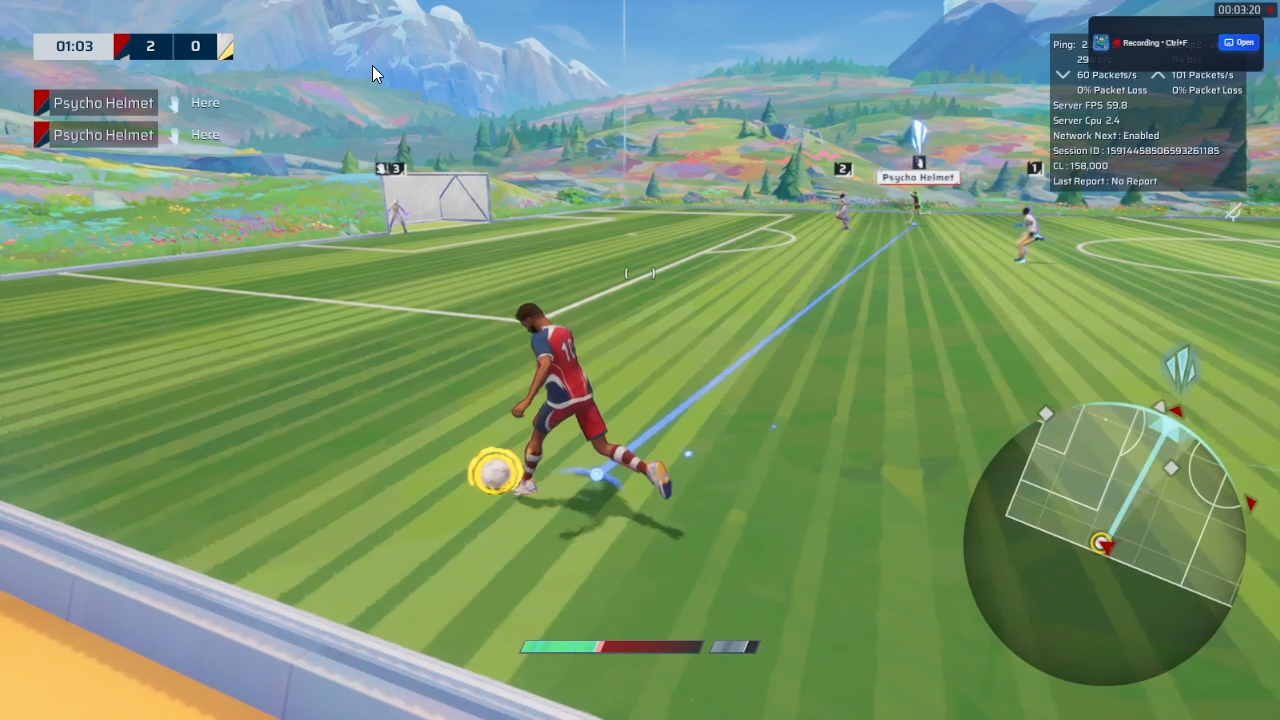
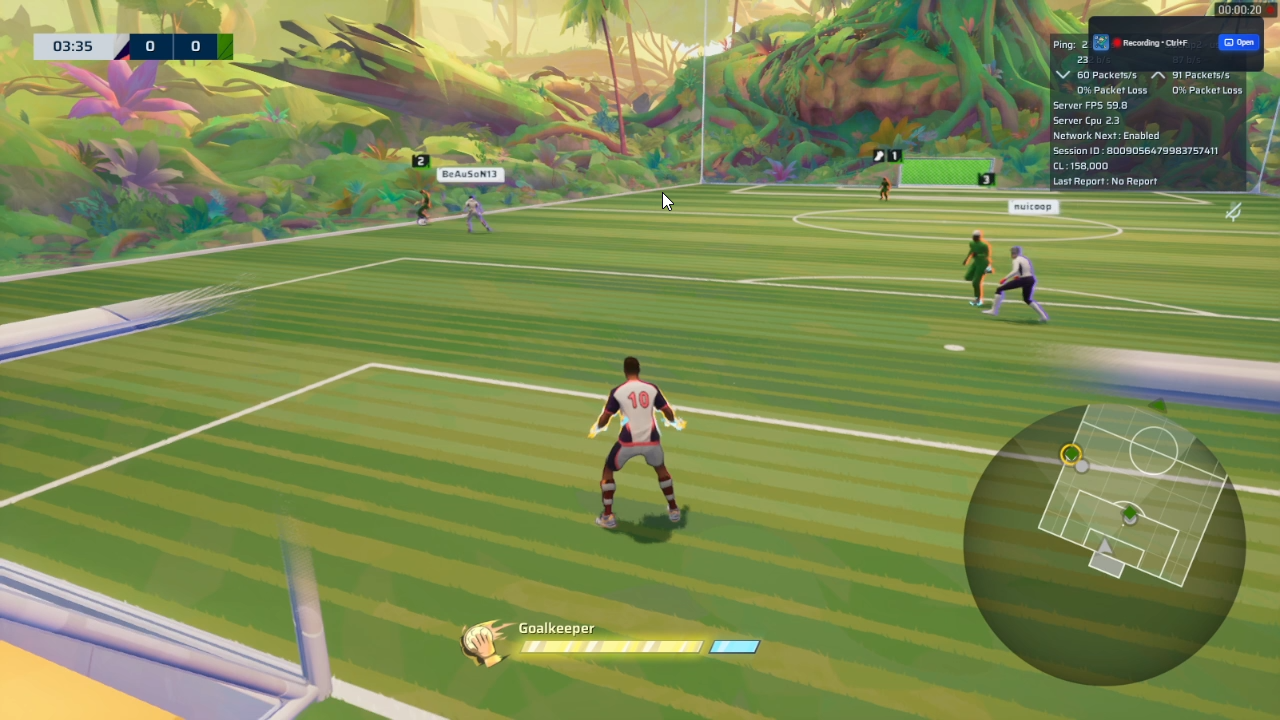
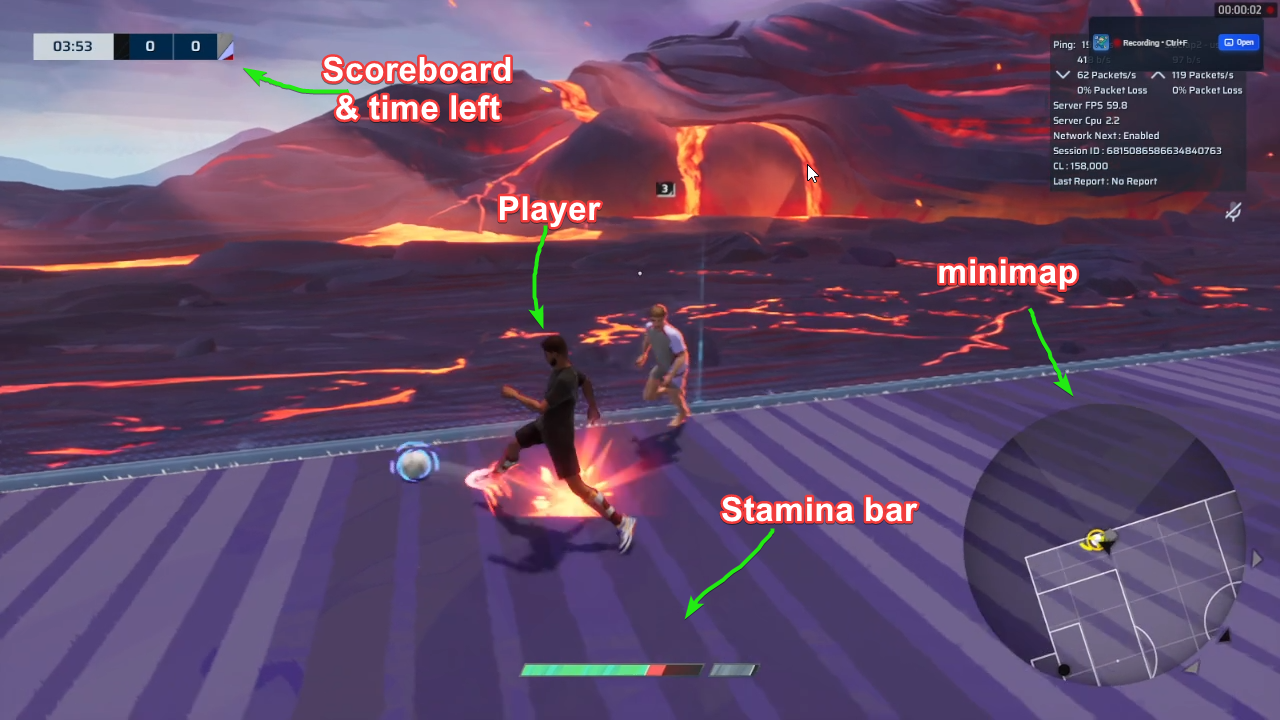
Here are the notable parts of the interface:
- Stamina bar at the bottom center. Enough stamina allows you to sprint.
- Minimap at bottom right. Shows where the ball and players are at.
- User’s player at the mid bottom center
With the given sections of the interface, what could indicate whether the user made a pass?
The first thought is to detect the user’s player.
I thought if I gathered enough data on what kind of players movements associate with a pass, I could create a model that ingests multiple frames of their movements and determine if constitutes a pass.
But as I played more matches, I realized that it’s hard to get this right due to the many edge cases.
The best scenario is when the player has ball possession and creates a normal looking pass.
But it’s also possible that the player slide tackles the ball, which gets kicked to their teammate, which is determined as a “pass”. This creates the issue where I have to detect not only the player’s movements, but also where the ball ends up (either to a teammate or enemy).
There are several other edge cases I could come up with, so I decided to throw out the idea of analyzing a player’s movement.
Actually, within the gameplay interface, there’s one extra component that occurs each time user makes an action:
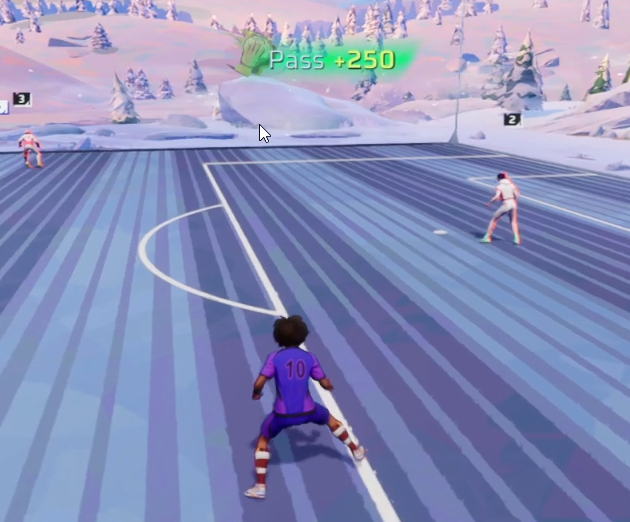
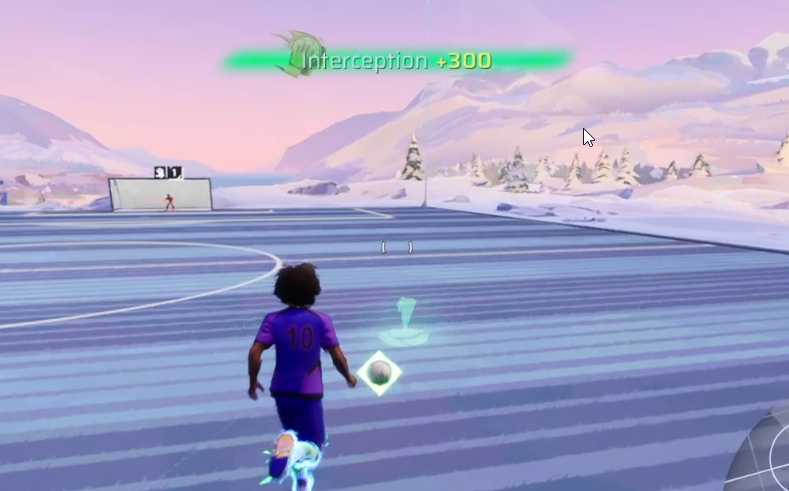
There’s this score notification popup animated in and out at the top whenever an action happens. Not only does it show the score, but also the exact kind of action associated with it.
What if I detect the presence of these notifications instead. So whenever this notification pops up, we would read off of the action name, and associate that action in the given timestamp.
My immediate thought was OCR. This is not an ML problem right? I just needed to throw in an OCR tool, have it scan for text, and associate that with the limited list of possible actions. Done.
The challenge is OCR is too slow for our use-case. Remember, we are not merely analyzing a single image, we would do thousands of them, in the form of frames per second of the gameplay. If it takes a long time to process the gameplay, users will uninstall the app since it’s inconvenient.
Okay, how about template matching? Well I’m not sure if it’s how I implemented it or not, but it doesn’t really yield accurate results. I suspect that it’s because these notifications overlay the map with lots of variables due to transparency, and template matching requires snippets of the image to be very consistent with the template itself, which is rarely the case.
After some digging, the approach I decided is to train a CNN that trains on cropped gameplay screenshots, where the crop area is located to where the notification would appear.
After all, the location of notification popups is always the same. At the top right center. Additionally, there are no gameplay settings that lets users relocate the position too.
There are caveats however, in the case that the game company Sloclap decides to make UI changes that could break our assumptions. However, I thought this was worth the risk.
Gathering data
Now that I know where the program should “look” to decide, it’s time to gather data. The data would consist of the gameplay screenshots.
This process was definitely the most time-intensive part of development. Gathering data meant playing hundreds of matches. One must truly be interested in the ML problem they’re trying to solve, otherwise the time they have to deal with at this stage can become grueling very quickly. I mean, for me, I genuinely enjoyed the game so it was not a problem to play hundreds of matches.
In total, I gathered around 2000 screenshots give or take. Nice.
With that out of the way, it’s time to preprocess these screenshots to ingest into the model.
Preprocessing
It would be less than ideal to ingest full screenshots of the gameplay, since that would lead to higher training times and noises. For example, we don’t need to analyze the minimap to know if a player made a goal. Since what we care for is the notification area, I decided to crop that part of the screenshots.
This led to a decision to be made. Since the notification consists of an action text (e.g. Goal) followed by the score (+1000), should I crop the screenshot such that it contains both text and score?
My initial intuition was yes, I should include both text and score, since they both indicate what the action is right?
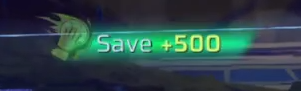
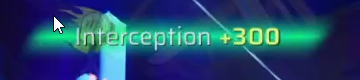
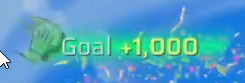
Midway through my data-gathering stage, I realized that this videogame’s UI can change based on the settings user put, including text language, which can be set to not only English, but also Spanish, Chinese, etc.
As the game supports 10+ languages, I thought I should train across these different languages. However, I thought of a much simpler approach. How about I just train based on the scores instead? Each action in the game associates with a score that’s constant to that action. Goals always lead to +1000 points for example. So I decided to adjust the cropping area to exclusively capture the scores.
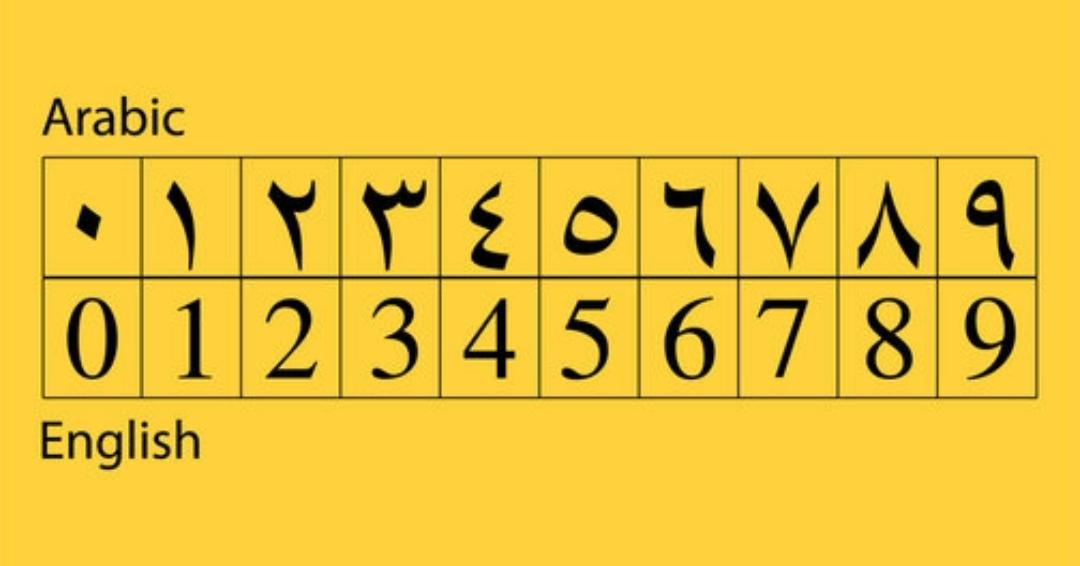
There’s one exception however. Arabic has a different numerical system, so this approach wouldn’t work. But ultimately I would put a disclaimer that this model won’t work for Arabic.
Another roadblock is that whenever the score appears, it presents itself as an animation. So should I screenshot all the different stages of the animation or only on specific stages? I assumed that including all stages would 1) make the annotation process more grueling 2) risk the model to overfit as the same group of animations would have the same map overlay, and 3) would confuse the model to associate what really classifies as an action. I decided to capture only the “peak” animations instead, where the action and score text are clearly shown.
Okay, now that the screenshots are cropped to the score area, what other image manipulations can I incorporate?
One challenge currently is that these score areas comprise the match’s map, the football arena. There are many variations of maps customized by the user, and new maps get released on a regular basis. Each map has different color variations, so I thought another way to reduce the variability of the screenshots is to manipulate the color. I initially thought of converting them into black and white. But later on I thought a better way is to isolate certain colors that are constantly emitted from these scores, which emit yellowish green glows. So I isolated both green and yellow channels, and set the rest as grayscale.
Annotation
Alright, the preprocessing step looks solid. It’s time to annotate the data. For this, I used Claude Code to create an annotating platform to associate screenshots into one of these actions:
Pass, Goal, Intercept, Save, Assist, or None (not associated with any action).
Claude Code did its thing in minutes with no hiccups. I was impressed.
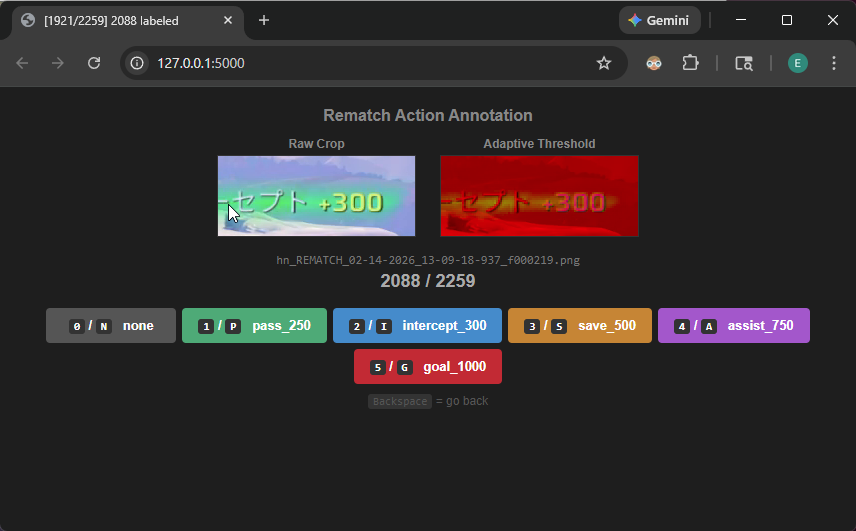 Figure: Custom annotation tool for labeling gameplay screenshots by action type
Each annotated screenshot would get passed into a CSV, where the training code will make use of eventually.
The annotation step was full of grunt work, where I had to go through every one of 2000 screenshots, and at the same time I can’t just turn off my brain since the annotations should be accurate. Eventually all screenshots are annotated, and I would split the data into 70% training, 15% validation, and 15% test.
Model architecture
Finally, it’s time to decide which model architecture to choose.
CNNs are great for image classification, so I went with that, where it would output logits associated with the 6 classes I mentioned above.
The architecture lays out in 2 stages: Feature extractor and classifier.
The feature extractor has 4 identical blocks, each doing Conv2d->BatchNorm->ReLU->MaxPool2d. Each block doubles the channel depth. The initial 3 channels consist of red, green, and grayscale channels we have preprocessed before.
The classifier would collapse the entire spatial dimension (HxW) to a single 1x1 value per 256 channels, flatten them into a vector of 256 values, do some dropout regularization, compresses them to 128, ReLU, another dropout, and finally compressed to the output layer producing 6 logit scores, one per class, where the highest score is the model’s predicted class.
Hard negative mining and synthesizing data
Along this training process, I also used Claude Code to generate a frontend platform to evaluate real video gameplays that’s not used in the training and validation sets. The platform would detect actions, and allow me to make corrections on incorrectly predicted screenshots, automatically transferring them into the dataset with the correct label. The term for this is called “hard negative mining”.
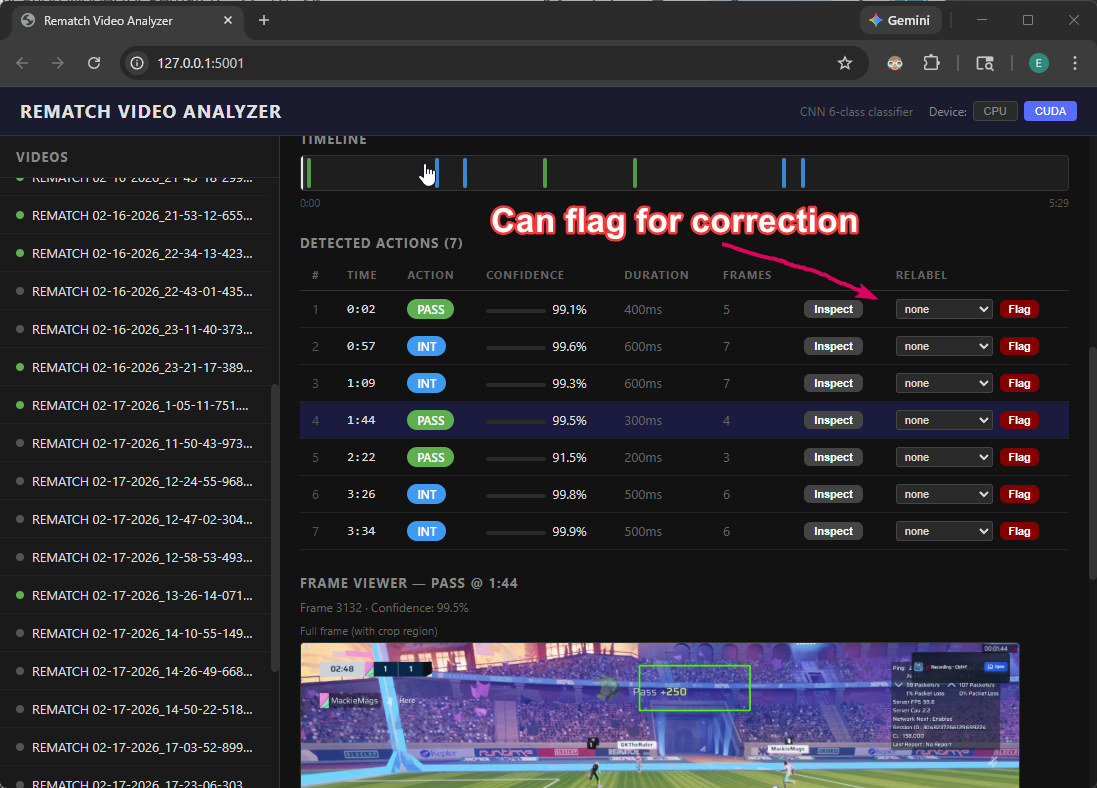 Figure: Video analyzer to evaluate model performance and flag mistakes. By Claude Code
Another approach I ended up doing is to synthesize new data. I isolated templates of the score text where the background becomes transparent, and overlay those scores in random data that has been annotated as none. The intuition is that the generated data is still classifiable by me as one of the possible actions, so it would also translate to the model being able to pick up stronger patterns that classifies to different actions correctly.
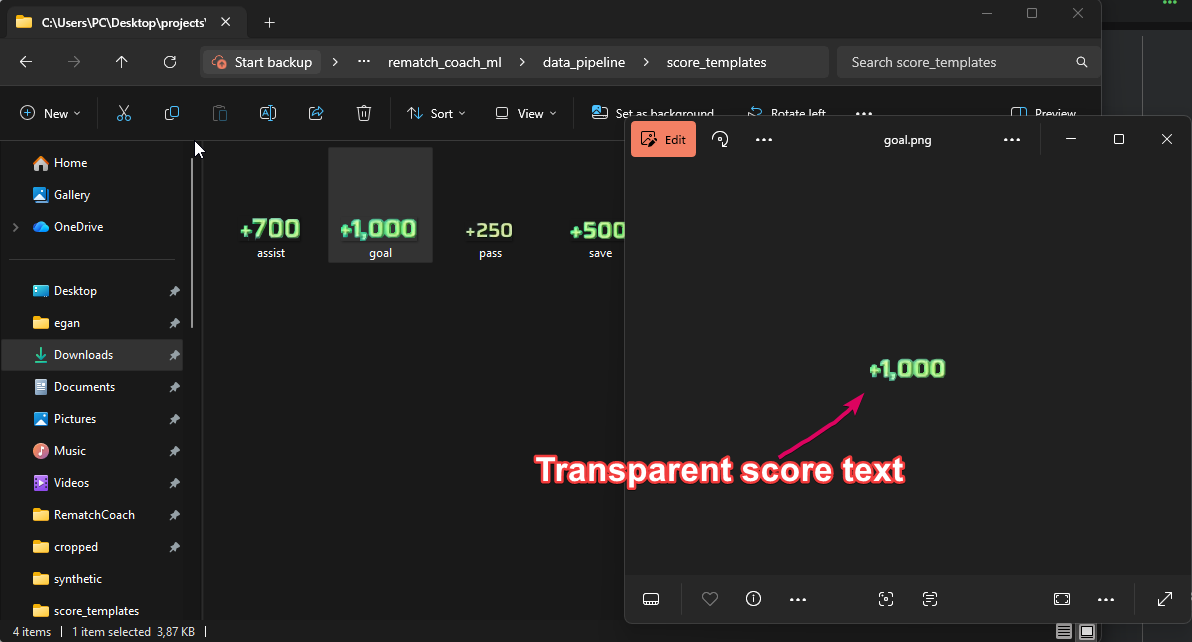
 Figure: Transparent score texts overlaid into “none” data around a range of different x coordinates
Results
This CNN architecture looks simple, but it was able to achieve really impressive results IMO.
After some back and forth iterating on the dataset and training code, the final accuracy I got, with around 150 Epochs of training, yielded around 98.87% in training and 98.39% in validation. While the test set is around 98.30%. Pretty good I’d say!
The final parameter count is around 423K, where the size of the model is about 1.3MB, it’s quite a lightweight model that would be expected to run fairly quickly when inferencing thousands of frames per match, which averages around 6 minutes of gameplay. For reference, ResNet-18 has around ~11M parameters and VGG-16 around 138M. The small size is appropriate here since my task is relatively narrow and focused, enabling faster training with relatively little data.
With that done, I converted the PyTorch model into ONNX so that it can be run on a web environment, given that my desktop app is web-based.
And finally, I could test it out in my real app. It felt very rewarding to see it working so well.
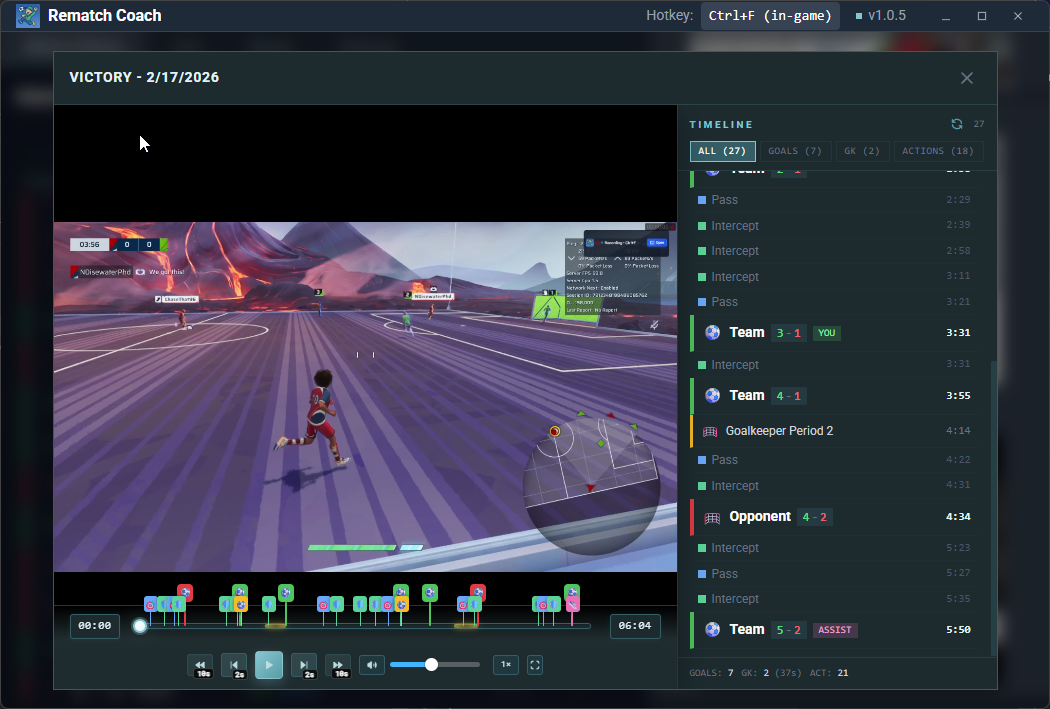 Figure: Video player with action timestamps
Learnings in a nutshell
- Data is moat. I feel like this is the only process that you can’t really automate with Claude Code, Codex, OpenClaw, what have you. The only effective way was to play and record the game, and curate the data on my own.
- You may not need to build off of pretrained models. My use case was so focused and targeted that I didn’t need to use pretrained models, allowing the model to be lightweight and fast.
- Synthesizing data can be surprisingly useful. My initial worry when synthesizing data is that they would look “different” than real data, leading the model to learn false patterns that will fail when being evaluated to the test dataset. But they did yield better accuracy compared to training without the synthesized data. This relates to my last point, which is…
- Higher domain knowledge leads to better ML models. My understanding of the game led to intuitions on what kind of data to focus on, and how to preprocess them. I wouldn’t imagine being able to come up with these decisions if I didn’t know the game inside out.
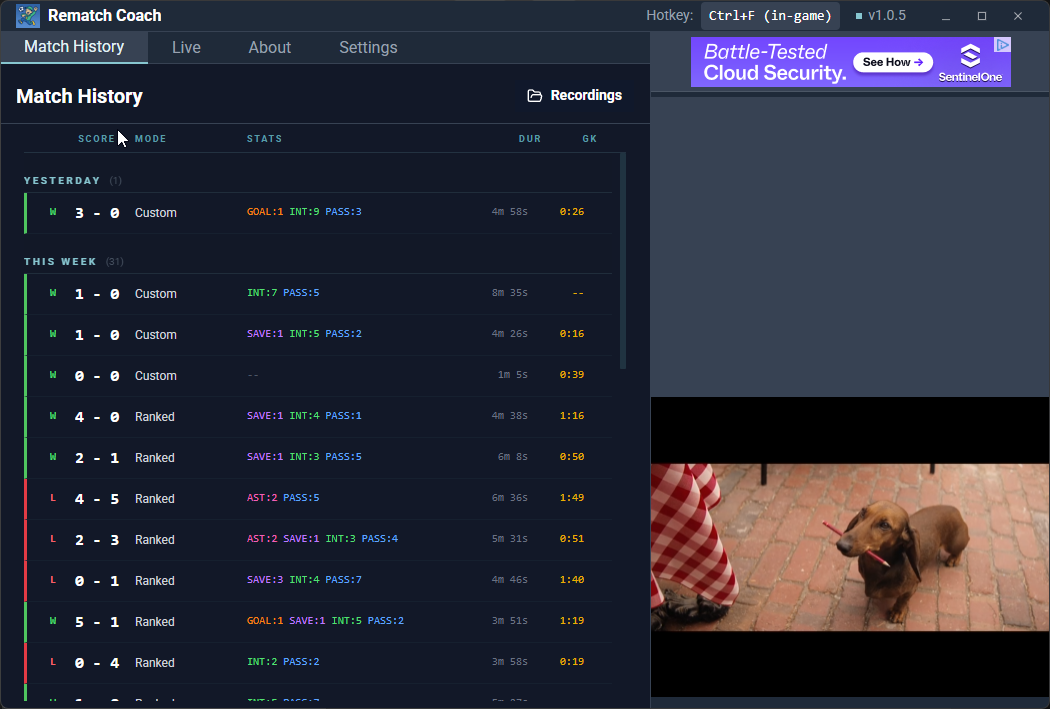 Figure: Final app with rich action stats metadata